Mind Map vs Concept Map: Structure, Uses and How to Choose
Mind map vs concept map compared on structure, uses and worked examples, with a clear guide to which one fits your study, planning or writing task.
If you can list every idea in a topic but can't explain how they affect one another, have you really mapped your understanding?
That's the gap behind the mind map vs concept map choice. A useful diagram must do more than put information on a page: it must show the kind of thinking your task requires. Sometimes you need to explore possibilities; sometimes you need to explain dependencies, test an argument, or uncover a missing connection.
Table of Contents
- Mind Map vs Concept Map at a Glance
- How Each Map Is Structured
- How to Build Each Map Step by Step
- One Topic Mapped Both Ways
- Matching Each Map to Your Task
- Common Mistakes and How to Fix Them
- Choosing the Right Map for Your Next Project
Mind Map vs Concept Map at a Glance
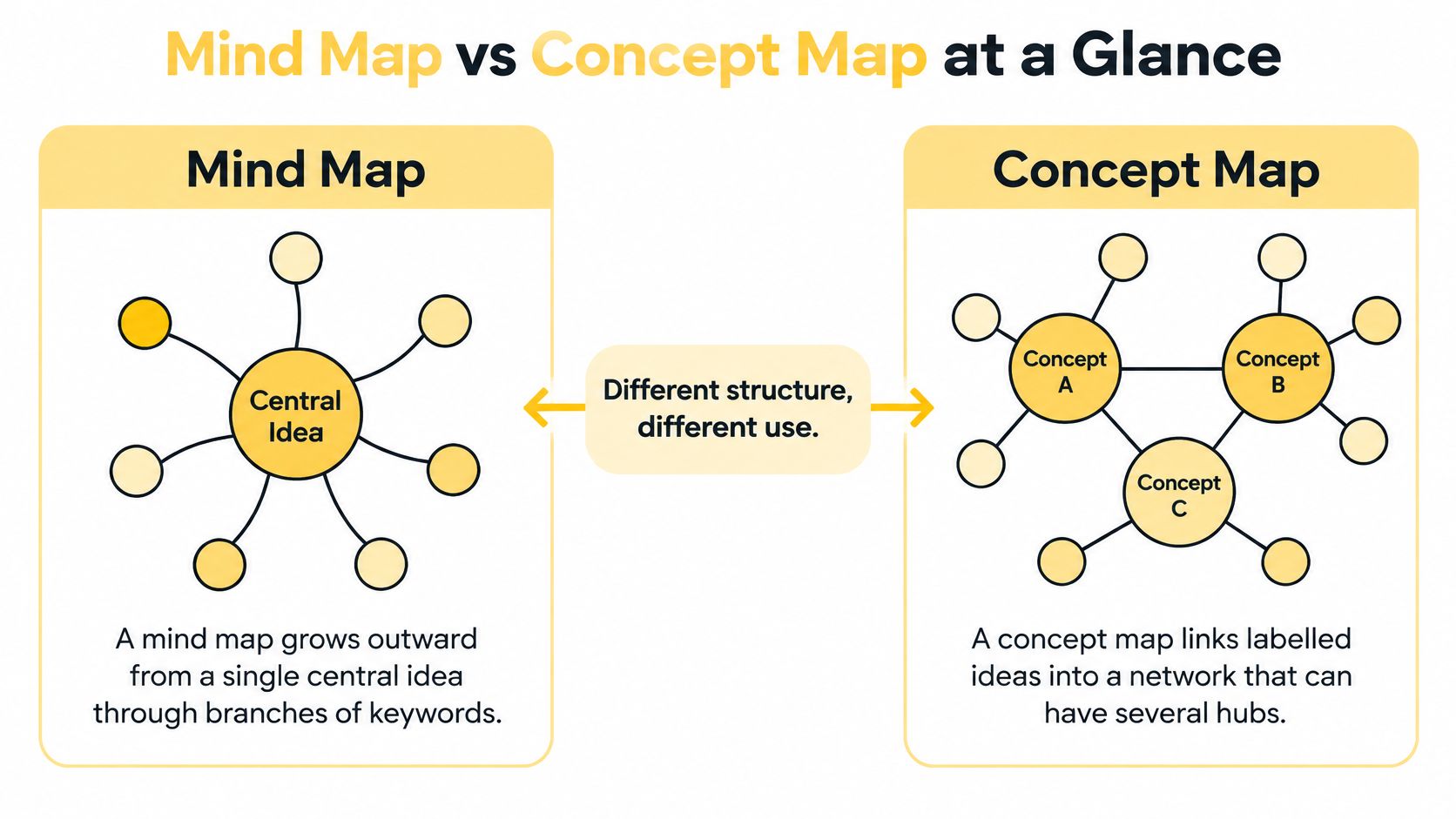
A mind map grows outward from a single central idea through branches of keywords, while a concept map links labelled ideas into a network that can have several hubs.
Mind map and concept map compared
| Criterion | Mind Map | Concept Map |
|---|---|---|
| Starting point | One central idea in the middle | Several key concepts, guided by a focus question at the top |
| How items connect | Branches radiate from the centre | Labelled links form a network |
| Link labels | Usually none; position implies the link | Required, usually a short verb phrase |
| Hierarchy | A centre-to-leaves tree | Flexible, with cross-links allowed |
| Typical node content | Single keywords, short phrases, icons | Named concepts that combine with links to form propositions |
| Origin | Popularised by Tony Buzan | Developed by Joseph Novak and his team at Cornell |
| Best use | Brainstorming, note capture, planning | Explaining relationships, analysis, revision of causal topics |
The visual similarity makes confusion understandable. Both methods use nodes and connecting lines, arrange information spatially, and organise knowledge visually. You can draw either with a pencil or build it in software.
Their appearance doesn't settle the choice. A colourful concept map is still a concept map, and a plain-text mind map is still a mind map. What matters is what the connections tell the reader.
Neither Map Is a Flowchart
Neither method implies a sequence of steps. A flowchart tells you what happens next, often with decisions and alternative routes. A mind map groups material around a topic; a concept map states relationships that may include causes, categories, requirements, or feedback.
A concept map can describe a process, but an arrow doesn't automatically mean next. Its label might mean requires, contains, or limits, each of which makes a different claim.
Choosing rule: If your question is what branches from this idea, use a mind map. If your question is how these ideas relate to each other, use a concept map.
How Each Map Is Structured
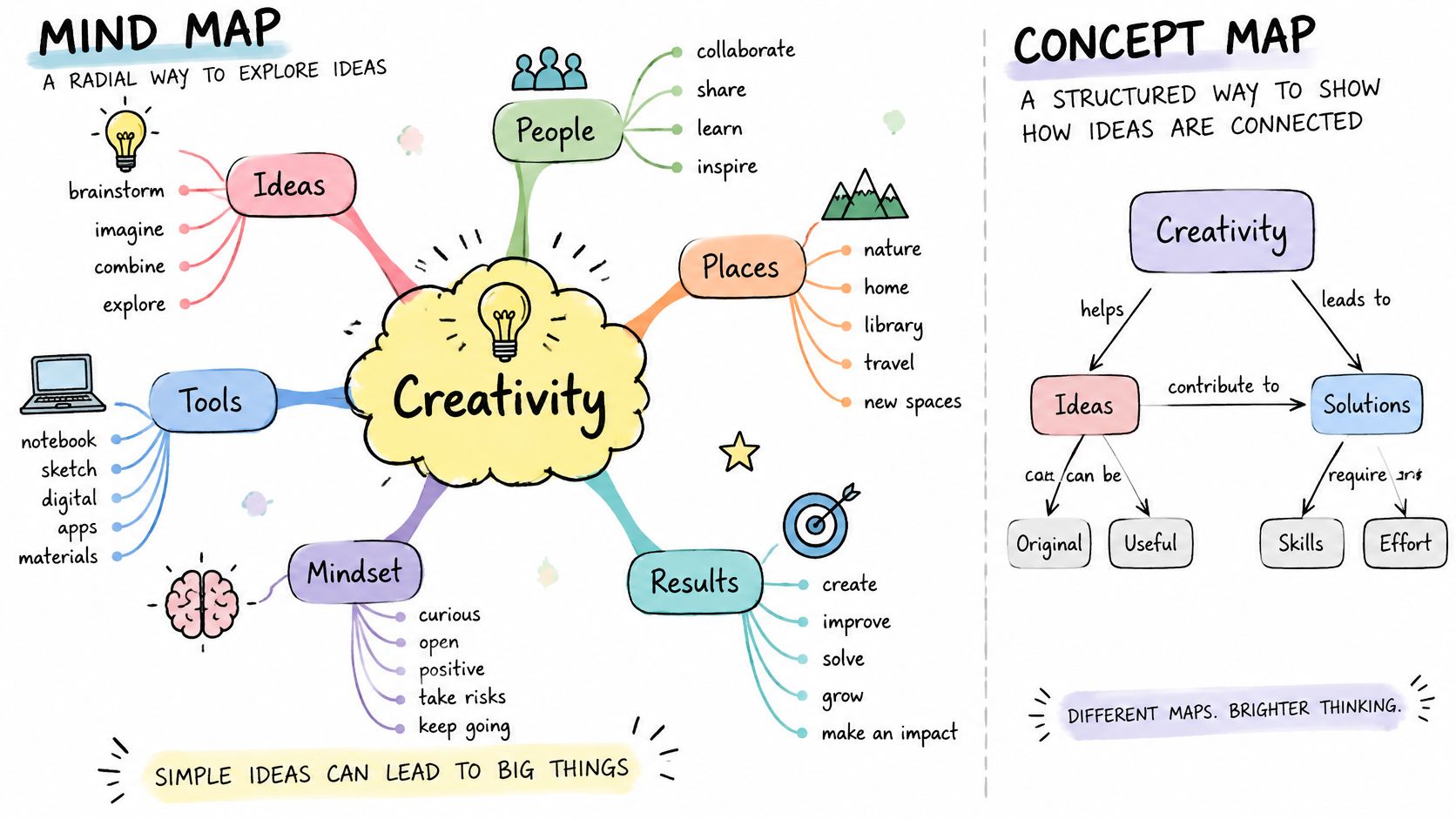
A Mind Map Groups Ideas Through Position
Start with a central word or image, then draw main branches for broad categories. Add sub-branches for supporting details, keeping labels short enough to scan without reading full sentences.
Say you're planning a school garden. Put School garden in the centre, then add branches for Plants, Equipment, People, Funding, and Maintenance. Under Equipment, add spades, gloves, and watering cans.
You understand that gloves belong to Equipment because of their position. The branch doesn't need a written explanation. This makes it easy to capture a thought before you know its precise significance.
Colour can distinguish categories, while icons can flag decisions or unanswered questions. Keep the main branches manageable enough to see together; if the centre becomes crowded, group related branches rather than shrinking the text.
A Concept Map Makes Claims Through Connections
A concept map usually places named concepts inside boxes or ovals. Labelled arrows connect them, with general concepts above more specific ones where that arrangement helps explain the subject.
For the garden, a focus question might be: What conditions would keep the school garden productive? Instead of merely grouping equipment, plants, and people, you could connect them like this:
- Soil condition influences plant growth.
- Watering requires access to water.
- Maintenance tasks require assigned volunteers.
- Volunteer availability limits the planting plan.
Each statement is a proposition: concepts joined by linking words to make a meaningful claim. You can inspect the statement and ask whether it's accurate, incomplete, or too broad.
Cross-links connect concepts from otherwise separate areas. For example, funding might limit both equipment purchases and access to irrigation. You don't have to duplicate Funding beneath separate branches to express those relationships.
In a mind map, the connection is implied by position. In a concept map, the connection is part of the content.
The basic unit of meaning in a mind map is the keyword or short phrase. In a concept map, it's the proposition, not an individual box.
The boundary can blur. When you add meaningful link labels and cross-connections to a mind map, you begin using concept-mapping logic. That's useful when your thinking changes, provided you make the relationships explicit rather than adding more arrows.
How to Build Each Map Step by Step
Use a blank page or canvas before choosing a decorative template. Templates can help with layout, but they can also encourage you to fill boxes that don't serve your question.
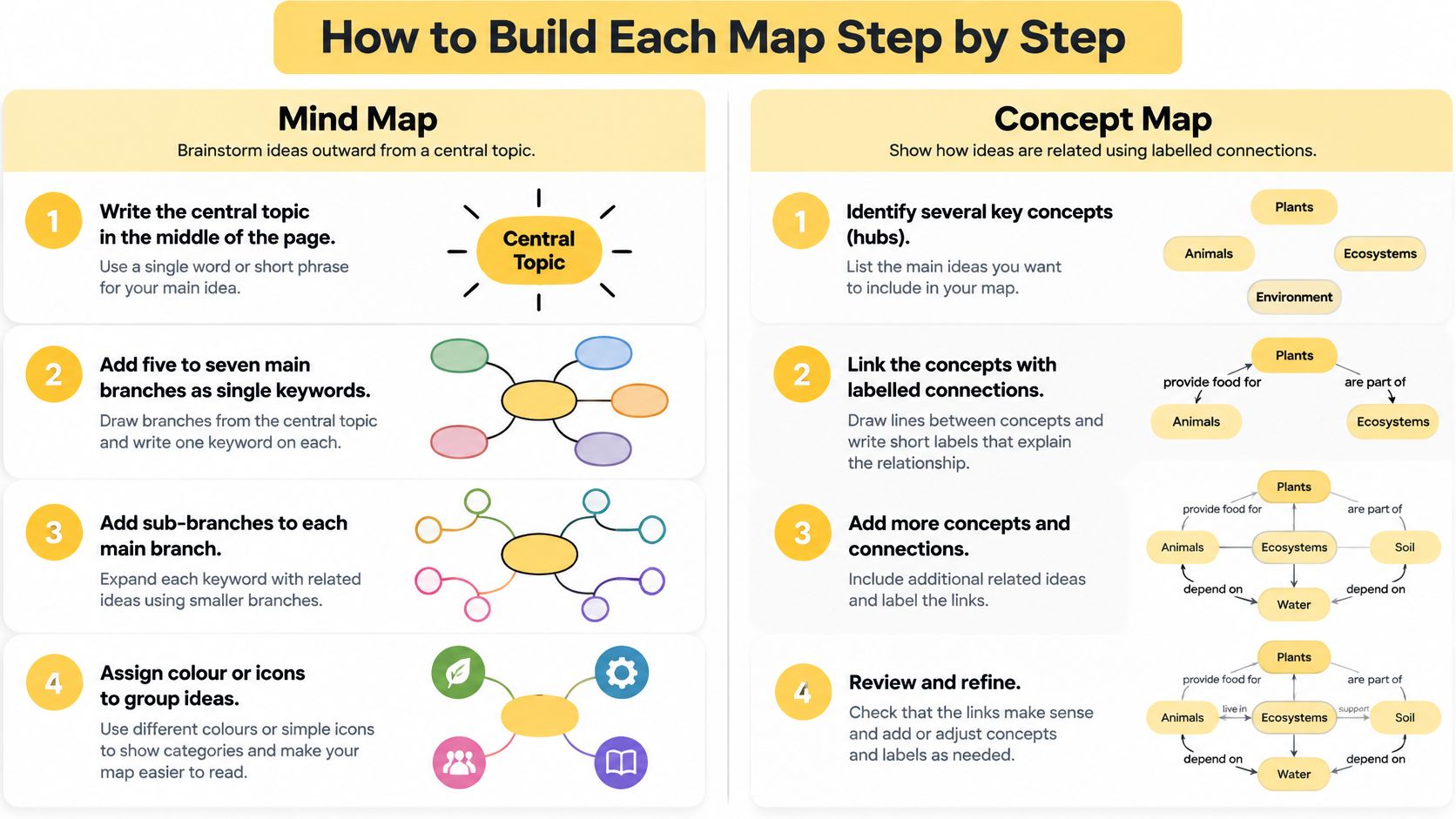
Build a Mind Map
- Put the topic in the middle. Choose a bounded topic, such as a community workshop, rather than a broad category such as education.
- Add main branches as single keywords wherever practical. For the workshop, these might include Audience, Content, Venue, Materials, and Promotion.
- Add sub-branches beneath each category. Put invitations under Promotion and worksheets under Materials so that position carries useful meaning.
- Assign a colour to each main branch. Use colour consistently to identify groups, not as a separate classification system you'll struggle to remember.
- Add an icon or simple image to important nodes. A question mark can identify an unresolved choice without turning its label into a sentence.
- Review and trim repetitions. Merge duplicate ideas, move misplaced details, and remove anything outside the topic's boundary.
If you're struggling to move beyond a flat list, Zemith's guide to ways to connect ideas through mind mapping offers a useful companion for exploring branching techniques. Keep your immediate purpose in view: capture useful possibilities before polishing the arrangement.
Build a Concept Map
- Write a focus question. Ask something the diagram can answer, such as what affects participation in the workshop, rather than using Workshop as the entire brief.
- List the key concepts before arranging them. Include ideas that help answer the question, not every term in your notes.
- Rank those concepts from general to specific. This helps you distinguish an organising idea, such as accessibility, from a particular detail, such as transport.
- Place the most general concept near the top. Arrange supporting concepts beneath it, leaving room for connections across the page.
- Connect concepts with labelled links. Read each connection as a statement, such as transport availability affects attendance.
- Add cross-links wherever concepts depend on one another. Don't add them merely to make the diagram look interconnected.
- Read every proposition aloud. Replace vague wording such as relates to with the actual relationship, or mark the connection as unresolved.
Allow more care for concept-map labelling than for initial mind-map capture. The difficult work is deciding what you mean, not moving boxes into tidy positions.
A map is ready for use when you can explain its main idea without looking at the original source. If you can name the boxes but can't explain a connection, that part still needs work.
One Topic Mapped Both Ways
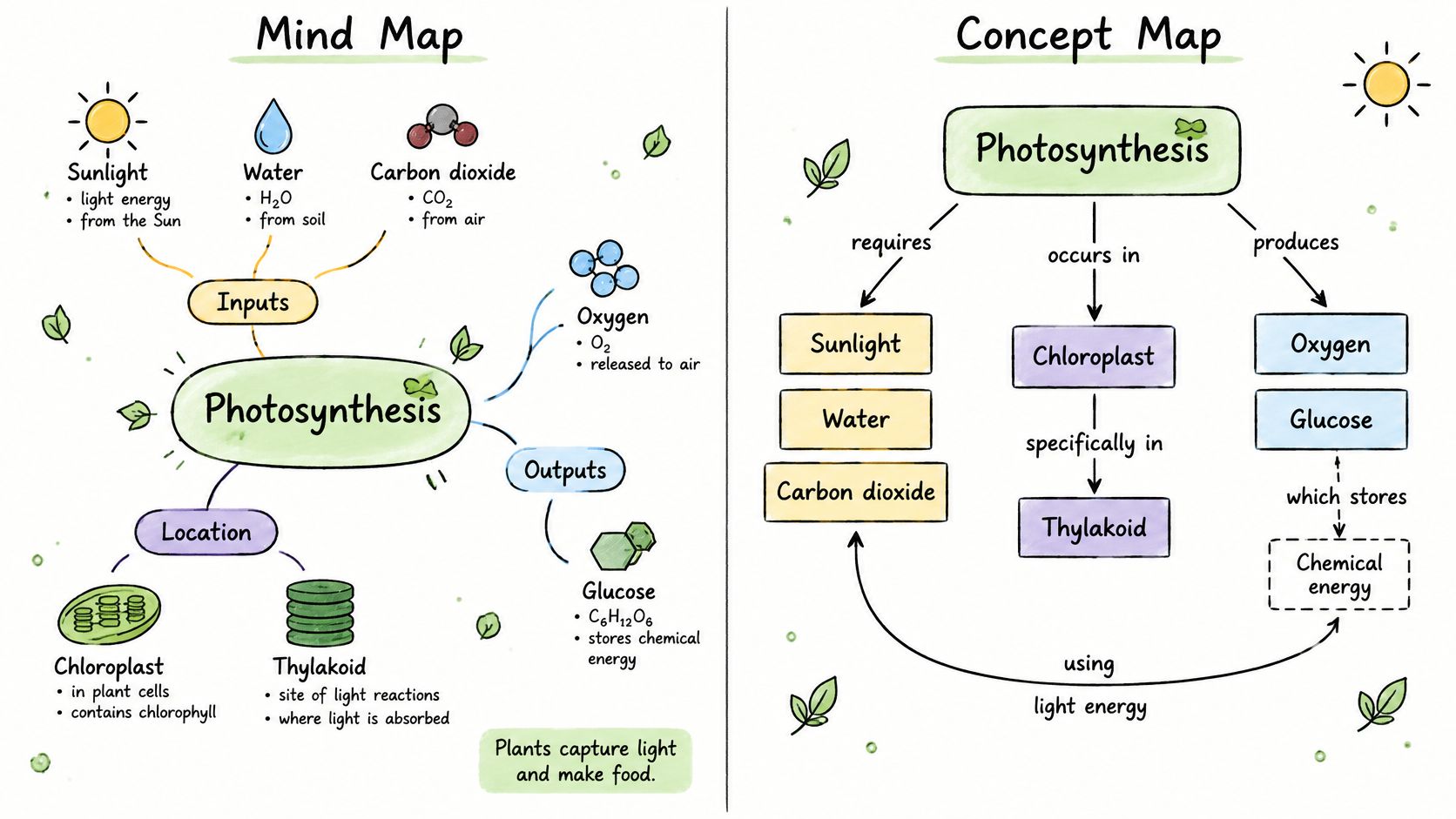
Say you're studying photosynthesis. You recognise the vocabulary in your textbook, but you need to discover whether you understand the mechanism.
The Mind Map Shows What Is Involved
Place Photosynthesis in the centre. Organise the surrounding material into these branches:
- Inputs: Sunlight, water, and carbon dioxide.
- Location: Chloroplasts, with thylakoid membranes and the stroma as more specific locations.
- Outputs: Carbohydrates, often summarised as glucose, and oxygen.
- Stages: Light-dependent reactions and the Calvin cycle.
This gives you a compact inventory. You can check whether you remembered the inputs, identify unfamiliar terms, and see which part of the chapter needs attention.
But the arrangement doesn't explain why the stages belong together. Placing the light-dependent reactions beside the Calvin cycle doesn't establish what passes between them. Likewise, listing water as an input and oxygen as an output doesn't explain their connection.
The Concept Map Shows How the Parts Depend on One Another
Use the focus question: How do plants turn light into chemical energy? Include plants, chloroplasts, sunlight, water, carbon dioxide, oxygen, light-dependent reactions, the Calvin cycle, and glucose, then add the intermediate concepts needed to explain the mechanism.
The key propositions could read:
- Sunlight supplies energy for the light-dependent reactions.
- Light-dependent reactions produce ATP and NADPH.
- ATP and NADPH supply energy and reducing power for the Calvin cycle.
- The Calvin cycle uses carbon dioxide to produce carbohydrate precursors.
- Carbohydrate precursors can be used to make glucose.
That last distinction matters. Drawing an arrow directly from the Calvin cycle to glucose can conceal the intermediate chemistry and encourage an oversimplified explanation.
Now connect water splitting during the light-dependent reactions to oxygen release. This cross-link connects an input, a stage, and an output that sat in separate mind-map branches. You can also locate the light-dependent reactions in the thylakoid membranes and the Calvin cycle in the stroma.
The mind map helps you recall what's in photosynthesis. The concept map lets you explain how the components work together. For an exam question asking why a disruption to the light-dependent reactions affects carbohydrate production, the second representation gives you the reasoning you need.
Matching Each Map to Your Task
Which map fits which task
| Task | Better Fit | Why |
|---|---|---|
| Brainstorming an essay or project | Mind map | Fast branching without deciding how ideas relate yet |
| Capturing lecture or meeting notes | Mind map | Quick capture around one central topic |
| Understanding a textbook chapter | Concept map | Shows how the chapter's ideas depend on each other |
| Writing a literature review | Concept map | Links theories, authors, and findings with stated relationships |
| Revising a causal subject for an exam | Concept map | Makes cause-and-effect chains explicit |
| Planning a project's scope | Mind map | Breaks one goal into a hierarchy of work areas and tasks |
| Teaching a system such as an ecosystem | Concept map | Makes feedback loops and dependencies visible |
A mind map suits generating and organising because you don't have to settle the relationship behind every association. A concept map suits explaining and evaluating because you must state what each connection means.
When an Essay Moves From Ideas to Argument
A student planning an essay about public transport might begin with branches for affordability, access, congestion, funding, and environmental effects. That's useful while discovering possible directions.
Once the student develops an argument, categories aren't enough. They need to distinguish claims, supporting evidence, objections, and assumptions. A concept map can show that a funding proposal supports a service improvement, while the expected benefit depends on an assumption about passenger behaviour.
For a literature review, the same distinction separates a collection of reading notes from a synthesis. Grouping papers by topic is a start; connecting their methods, definitions, disagreements, and limitations makes the analysis more useful. A literature review canvas can provide space to keep those connections alongside the underlying notes.
When Product Planning Moves From Scope to Dependencies
A product team might brainstorm features under Onboarding, Search, Reporting, and Account Management. This helps establish possible scope without stopping to resolve every technical question.
Later, the team needs to know which features require shared data, permissions, or infrastructure. A concept map can expose that reporting depends on event collection, while event collection depends on agreed definitions. Those are dependencies, not merely related feature ideas.
Handoff test: When discussion shifts from what else belongs here to what must be true for this to work, consider changing the map.
The same topic can need both methods during the same project. A mind map can remain useful as the scope overview while a separate concept map handles the reasoning. You don't need to force every purpose into a single diagram.
Common Mistakes and How to Fix Them
The most common mistake is choosing a map by how it looks rather than by what the task needs. A learner picks a mind map because it's quick to draw, then tries to explain a relational subject through increasingly crowded branches.
The result may contain the right vocabulary without showing the required understanding. More detail won't repair a structure that's doing the wrong job.
Map problems, causes and fixes
| Symptom | Likely Cause | Fix |
|---|---|---|
| Branches multiply without limit | The central idea has no boundary | Narrow the topic, group the main branches, and move excess detail into sub-maps |
| Links look arbitrary | Connections have no labels | Replace ambiguous concept-map lines with specific verb phrases |
| Main idea is hard to find | All nodes carry equal weight | Rank nodes and make the key concepts visually prominent |
| Map becomes a tree of everything | A relational topic was drawn as a mind map | Rebuild around a focus question and explicit relationships |
| No clear entry point | The concept map lacks a focus question | Write the question and place it at the top |
Repair Meaning Before Appearance
If a link is difficult to label, don't hide the uncertainty behind a vague connector. Separate what you know from what you still need to check. In a causal topic, a label such as causes deserves more scrutiny than a label such as is associated with.
For notes that keep accumulating unrelated material, a visual Zettelkasten offers another way to organise connected ideas without treating everything as part of a single topic.
Split a map when you can no longer scan its main structure or follow its connections without repeatedly losing your place. Give each sub-map its own central idea or focus question, then preserve a clear connection to the overview. Splitting is a repair, not a failure to fit everything onto the page.
Choosing the Right Map for Your Next Project
Start with a mind map when you don't yet have a structure and need to generate possibilities. Start with a concept map when you have source material and must explain how its ideas connect. Use both when the project moves from exploration to analysis.
Before committing to software, check whether you can keep the map in a format you control alongside your other notes. A picture preserves appearance, but it may not preserve editable text, connections, or the underlying organisation.
Choose Tools That Preserve Your Work
Paper and pen work well when portability and easy redrawing matter more than search. For digital options, the mind mapping picks from KeenVerdict can help you build a shortlist; test each candidate with your own material rather than choosing from screenshots alone. For mixed notes and diagrams, compare infinite canvas apps against the same ownership and editing requirements.
Acres is a local-first option among these approaches. Our cards are stored as plain Markdown files and whiteboards as readable JSON, in a folder you pick. That gives you accessible underlying files rather than only a rendered diagram.
Our built-in assistant reads the whiteboard and can make edits such as new cards, connections, and sections, with rewrites arriving as word-level diffs you apply. Treat any proposed relationship as something to check, especially when the map represents a scientific explanation or an argument.
Try Both on Current Work
Choose a topic from your current work and draw a small version in each format. Keep the content comparable so you're testing the representation rather than how much you included.
Then note which map exposed a gap your written notes had missed. Use that discovery to choose your working map, and keep the other only if it serves a distinct purpose.
Acres gives you a visual workspace for keeping Markdown notes, branching ideas, and connected explanations together on whiteboards. Visit Acres to try mapping a current topic, then refine the connections while keeping your files in a folder you control.