Taking Notes on a PDF: A Two-Pass Workflow That Works
Learn taking notes on a PDF with a two-pass workflow: highlight selectively, turn passages into linked notes, and keep sources traceable.
Marking up a document feels like progress. The evidence says otherwise. A CHAIS 2014 study on annotation found that annotation tools added roughly 29% more reading time than reading without annotation, and on-screen marking didn't improve inference-level comprehension in one controlled trial, while print annotation improved both accuracy and response time (CHAIS 2014 annotation study).
The fix isn't to stop marking. It's to stop treating a highlight as a finished note. Every mark is a claim you'll have to trace back to a page, a section heading and a specific version of the file. Once you accept that, the questions change: what deserves a mark, how many marks you allow yourself, and what you write next to each one.
What follows is the workflow I'd hand to a doctoral student starting a literature review. Two passes, a hard annotation budget, and a fixed note structure that doesn't collapse when the PDF gets replaced.
Table of Contents
- The Two-Pass Method and Annotation Budget
- How to Turn a Highlight Into a Linked Note
- Making Reliable Notes From Broken or Scanned PDFs
- Keeping Notes Traceable When the File Changes
- Turning Linked Notes Into a Written Argument
- Choose a Note Setup You Can Keep Using
The Two-Pass Method and Annotation Budget
Pass one is about shape, not sentences. Read the abstract, then the headings, then every figure and table caption, then the conclusion, and put nothing on the page. What you write instead is a page map in a scratch file: the research question as the authors frame it, the three or four claims the paper needs to land, the method, and the evidence types you expect to check later.
A page map for a twenty-page paper might read: "p. 2 question, p. 4 sample, p. 7 main table, p. 12 limitation, p. 14 appendix with the measure." This takes ten minutes and prevents the most expensive habit in taking notes on a PDF: deciding what matters while you're still learning what the paper says.
Pass two is where marking happens, and it happens under a budget. One highlight per major claim is the ceiling for a paper you'll cite once. For dense material, let annotation cover roughly 5 to 10% of the pages. The budget isn't aesthetic. Marking costs reading time that the comprehension often doesn't repay, so every mark should earn its place by changing what you'd cite, argue or check next.
Use labels that show what a mark is for
Not every highlight does the same job, so label each one as evaluating, connecting, questioning, inferring or summarizing. The distribution reveals where your reading habits fall apart. In a digital annotation study of language learners, evaluating comments made up 65.6% of annotations in one group and 59.7% in another, while connecting comments made up 19.9% and 12.9% (Languages, MDPI). In that semester study, annotation depth predicted end-of-semester comprehension more strongly than annotation frequency did.
Judging text is easy. Connecting it to something you already hold is the actual work, and inference and summary marks barely appeared in either group.
Annotation review rule: every ten marks, stop and confirm the batch contains at least one connection, one question and one synthesis note. If the batch doesn't, you've been reading, not studying.
Treat those percentages as a mirror rather than a law. The cited evidence includes observational and qualitative designs, so the numbers describe a common failure mode, not a universal effect size.
| Stage | What you do | What you mark | Output |
|---|---|---|---|
| Pass 1: structure | Skim abstract, headings, figures and conclusion | Nothing; write a one-line page map | Research question, claims, methods and evidence list |
| Pass 2: selective marking | Reread only passages that affect your decision | One highlight per major claim, about 5-10% of pages | Highlights with page numbers |
| Note conversion | Turn each highlight into a four-field note | Nothing new | Claim, evidence, interpretation and follow-up question |
| Synthesis | Write a summary after each section and link it to existing concepts | Nothing new | Section-level synthesis note |
Pick one paper this week and run pass one only. Time it. If it takes more than fifteen minutes, you're reading pass two too early.
How to Turn a Highlight Into a Linked Note
A highlight records that something caught your attention. It doesn't record what the author claimed, whether you believed it, or which version of the file you were reading. Converting each mark takes about ninety seconds, and it's the difference between a page of yellow rectangles and a citation you can defend in a viva.
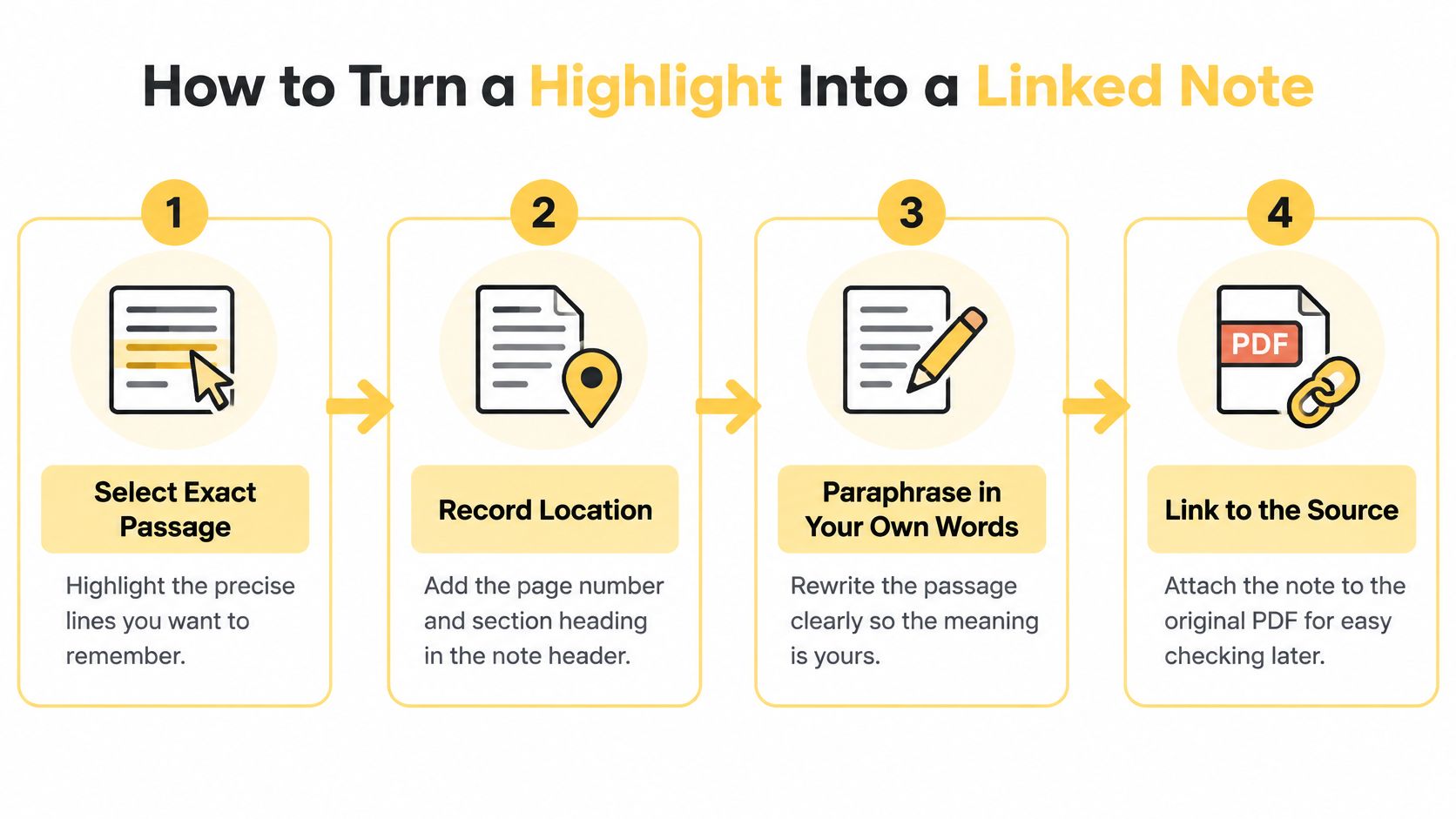
- Take the exact passage, not the paragraph. Highlight the clause that carries the claim, then copy it into the note before anything else shifts. If your mark spans three sentences, you'll reread all three next month to find the one that mattered.
- Put the location in the note header. Page number, section heading, and a figure or table number where one applies. "The paper argues sampling bias explains the gap" can't be checked later. "p. 8, section 3.2, Table 2" can be checked in seconds.
- Paraphrase in your own words. Copied text almost never gets reread, which is why it's one of the most common pitfalls in PDF annotation. Write the structure instead: X claims Y because Z, measured on W. If you can't paraphrase it, you don't understand it yet.
- Split the author's claim from your reading. Four fields do this: claim, evidence, interpretation, follow-up question. The claim line stays in the author's voice. The interpretation line is yours, and it's the line you'll argue from later.
- Write one concrete next action. "Find whether Chen et al. use the same attrition measure" beats "read more on attrition" every time, because it can be finished.
- Link the note to something you already have. A concept, another paper, a working hypothesis. An unlinked note is a card in a drawer.
Filing conventions matter as much as the fields. If you're deciding how notes get titled, tagged and grouped across projects, the Model Diplomat note taking guide lays out several conventions worth borrowing rather than inventing from scratch.
Store citation metadata once per source, not once per note: DOI or stable URL, document version and access date. Then every note from that source points at one record.
The one-week test
Read the note alone, seven days later, without opening the PDF. Can you say what the source argued and why it matters to your project? If the interpretation line is vague, rewrite it before you take another note. This is the same logic behind a visual Zettelkasten built on linked cards, where the connection does the retrieval work and the card only carries the excerpt.
Making Reliable Notes From Broken or Scanned PDFs
Accessibility is the angle most note-taking advice skips. A review of 20,000 scholarly PDFs published between 2014 and 2023 found that only 3.2% met all tested accessibility criteria, while 74.9% failed to meet even one (arXiv review of scholarly PDF accessibility). Whatever you're annotating this week is more likely to be structurally broken than not, and a broken source produces notes that point at nothing.
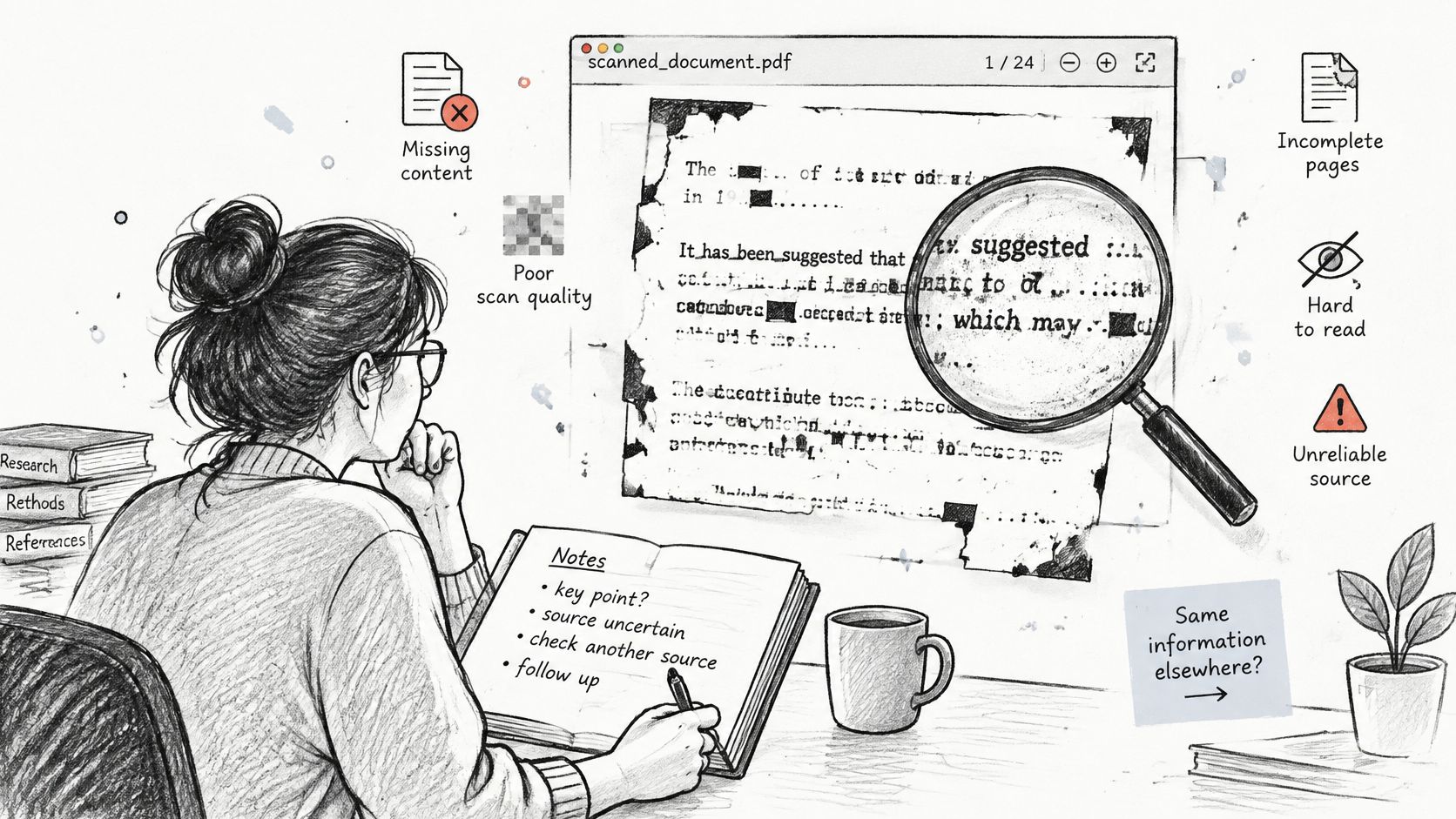
Each defect damages a different part of your record. A scrambled reading order pulls quotes out of sequence, so a sentence from the limitations ends up attributed to the method. Missing tags mean headings and captions never get detected, leaving you with text that has no skeleton. Inaccessible tables collapse into a run of numbers with no column labels. Figures without alternative text drop out of the record entirely, taking the visual evidence with them. Scanned pages without OCR can't be searched at all, and formulas get mangled the moment they pass through conversion.
Why converting to text doesn't fix it
"Just convert the PDF to text" is the reflex answer, and it's incomplete. Conversion discards layout, column order, captions and reading order, which are precisely the cues you need to cite a passage correctly. Run the conversion and you'll often have searchable text that no longer tells you which paragraph it came from.
The workarounds are unglamorous and they hold. Check the page image before you quote anything from a suspicious page. Type the heading into the note header from what you can see, not from what the parser guessed. Rebuild a table as a labeled text summary with row and column names. Describe a figure in one plain sentence and state the claim it supports. After OCR, verify every quoted line against the page image before it enters your notes.
| Defect | What breaks in your notes | Workaround |
|---|---|---|
| Broken reading order | Quotes come out of sequence | Check the page image and record the section and paragraph in the note |
| Missing tags | Headings and captions are not detected | Copy the heading into the note header from the visible page |
| Inaccessible tables | Table meaning is lost in plain text | Rebuild the table as a labeled text summary with row and column names |
| Figures without alternative text | Visual evidence is absent from the notes | Write one plain sentence describing the figure and the claim it supports |
| Scanned pages without OCR | Text cannot be searched or copied | Run OCR, then check every quoted line against the page image |
| Mathematical notation | Formulas are garbled by conversion | Keep a page reference and transcribe key equations by hand |
A note is only as trustworthy as the page location it points to, and that location has to survive the source being hard to read.
Keeping Notes Traceable When the File Changes
Here's the failure, and it's common enough to plan for. You quote a passage in June from page 11 of a working paper. In November a revised version replaces it, the paragraph moves to page 9, and the sentence you cited has been reworded. The highlight in your annotation app still shows the old text, attached to a page that no longer says that.
The tooling doesn't rescue you. A 2024 survey evaluating 50 annotation tools found that they can be difficult to discover and reuse, that input and output formats lack well-defined standards, and that there's no community-agreed metadata vocabulary for annotations (2024 survey of annotation tools). A note can preserve the exact words and lose the page, the version, the author, the date and every relationship to the rest of your evidence.
So store the quoted passage or a concise paraphrase next to stable metadata, and keep your interpretation on a separate line from the source text.
| Field | What to record | What it protects against |
|---|---|---|
| Source identifier | DOI or stable URL of the paper | Losing the source when the file is renamed |
| Document fingerprint | A file hash or version label | Citing a passage from a replaced or revised PDF |
| Page and section | Page number and section heading | Losing the location when the layout reflows |
| Annotation type | Highlight, comment or your own summary | Confusing the author's words with your interpretation |
| Creation date | Date the note was written | Forgetting which reading state the note reflects |
| Note role | Source quote, paraphrase or interpretation | Mistaking your inference for the author's claim |
Standards work is moving toward fragment-level selectors that address a region of a file rather than a page number, and open-annotation research imagines annotations that travel across PDF, HTML, EPUB and data formats. Useful direction, not something to depend on inside today's readers, so keep the metadata in the note itself.
The honest version of the rule: a visual highlight is not durable evidence. A durable note links a claim to a source fragment and to a document version. If you can't reconstruct all three from the note alone, the note is a bookmark.
Turning Linked Notes Into a Written Argument
Notes become knowledge when you stop adding them and start grouping them. The move is to write a higher-level argument while the reading is still fresh, not after the pile reaches fifty sources.
- Pull one theme into one place. After a cluster of four or five sources, collect every note labelled connecting or questioning that touches a single theme onto one page. Ignore the rest for now.
- Write three sentences. What the sources agree on. Where they conflict. What remains open. Three sentences force a position; a page of quotes doesn't.
- Check every line against its source note. If the synthesis says two studies find the same effect, open both notes and confirm the measures match. A mismatch here is how a literature review acquires a claim nobody made.
- Mark the synthesis as yours. Your sentence, your inference, not the author's claim. Where the evidence is thin, say so in the sentence rather than in a footnote you'll delete.
- Recheck before it enters a draft. A synthesis line graduates into a literature review paragraph only after its evidence has been compared with the page image again.
The traceability test: if a synthesis sentence can't be traced from the paragraph to the note to the page to the file version, cut it or check it.
Some patterns will be thin, and that's a finding worth writing down. A pair of learner groups in one digital annotation study showed connecting comments in the teens as a share of all marks, which supports a cautious synthesis line about readers under-connecting sources rather than a confident one. Say the pattern is thin and name the design.
Drafting against a shared canvas helps here, because a literature review canvas keeps each theme, its sources and its open questions visible in one frame while you write.
Choose a Note Setup You Can Keep Using
Pick a setup by three tests, not by a feature comparison. Most readers choose on interface and regret it six months later when the notes won't leave the app.
Three tests to run before you commit
- Location. Decide where PDFs live and keep them in one folder tree, so every note points at a file that stays put. If your PDFs are scattered across Downloads, Desktop and three cloud drives, your notes will point at ghosts.
- Structure. Decide whether each source gets exactly one note or one board, with its four-field notes kept inside it. One source, one container. Sources with a container are findable; sources spread across a tag system are not.
- Survival. Open one note in a plain text editor and check that the claim, evidence, page, source link and document fingerprint are all still readable. If the note only exists inside an app's database, you don't own it.
A reader's built-in sidebar passes the first test and often fails the third. Sidebars are fast and tie notes to one application, which is fine for a single paper and painful across a thesis. File-based workspaces keep notes portable but ask you to be disciplined about structure.
Acres sits in the second group: a local-first workspace where notes stay as plain Markdown files and whiteboards as readable JSON in a folder you choose, and where a PDF highlight becomes a card that keeps its link back to the page. The two-pass method maps onto cards and connections without a separate filing ritual. If you're still weighing categories, this ranked list of note taking tools is a reasonable starting point for comparing what each one does with a PDF.
The question of whether a single-purpose note taker app beats a full workspace comes down to those three tests, not to the length of a feature list.
Commit to one setup for a month before you judge it. Switching tools mid-review costs more than any missing feature.
The next step fits in an evening. Take the paper you're reading now, run pass one without marking anything, convert three highlights into four-field notes, then open the note file in a plain text editor and confirm every field still reads.
Acres is built for exactly this handoff: PDF highlights become cards linked to the page they came from, notes stay as plain Markdown files you can open anywhere, and the two-pass workflow has a place to live after the reading is done. You can try the desktop app on macOS or Windows with a 14-day trial and keep your files in a folder you control. Start at Acres.